Network Plan


This SOP defines the process for instrumenting Airowire network devices using Datadog to enable centralized monitoring, network visibility, and proactive alerting.
This procedure applies to all Airowire network infrastructure including:
- Routers
- Switches
- Firewalls
- Access Points
- Network Gateways
These devices will be monitored using SNMP telemetry integrated with Datadog.
Before starting instrumentation, ensure the following:
- Access to network devices (SSH or management interface)
- SNMP supported on devices
- Datadog account access
- Monitoring server available to run Datadog Agent
- Network connectivity between monitoring server and devices
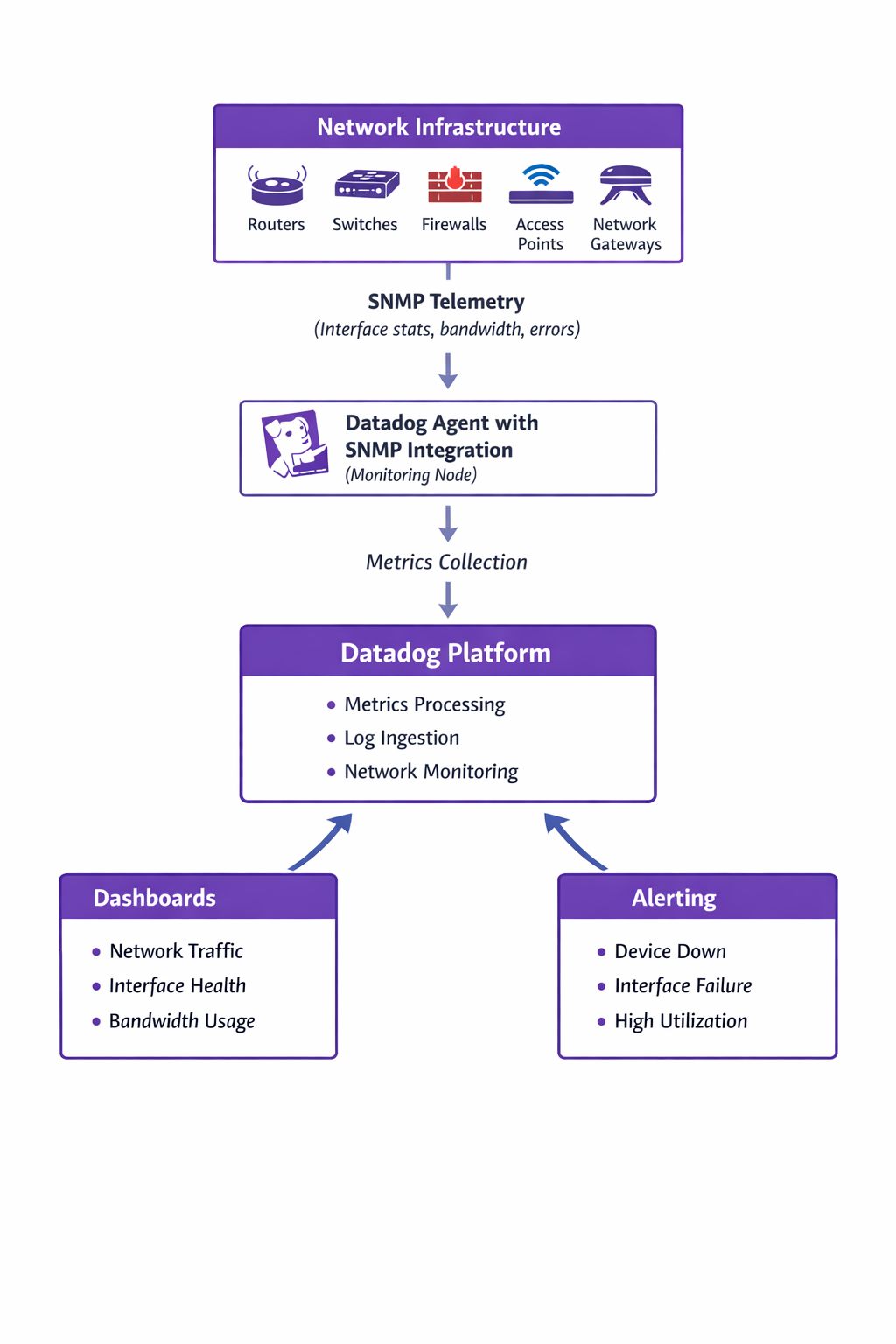
Network devices expose telemetry via SNMP. The Datadog agent collects telemetry and sends it to the Datadog platform for monitoring, visualization, and alerting.
Step 1 — Identify Network Assets
Create a network asset inventory including:
- Device hostname
- IP address
- Device type
- Location
- SNMP version
Store this information in a centralized inventory document.
Step 2 — Enable SNMP on Network Devices
Configure SNMP on each network device.
Recommended configuration:
- Use SNMPv3 for enhanced security
- Configure authentication and encryption
- Restrict SNMP access to the monitoring server
Test SNMP connectivity using:
Step 3 — Install Datadog Agent
Install the Datadog Agent on the monitoring server.
Verify that the Datadog agent is running successfully.
Step 4 — Configure SNMP Integration
Configure SNMP monitoring in the Datadog agent configuration.
Restart the Datadog agent after updating the configuration.
Step 5 — Verify Metrics Collection
Check the Datadog dashboard to verify that network metrics are being collected.
Expected metrics include:
- Interface traffic
- Interface errors
- Packet drops
- Device uptime
- Interface status
Step 6 — Create Network Monitoring Dashboards
Create dashboards to monitor network performance including:
- Device availability
- Interface bandwidth usage
- Traffic patterns
- Packet errors
These dashboards provide visibility into the overall health of the network.
Step 7 — Configure Alerts
Create alerts for critical network conditions.
| Event | Alert Condition |
|---|---|
| Device Down | SNMP unreachable |
| Interface Down | Interface status change |
| High Bandwidth | Utilization above threshold |
| Packet Errors | Error threshold exceeded |
Alerts should notify the Network Operations team immediately.
Confirm that instrumentation is successful by verifying:
- SNMP connectivity to devices
- Metrics visible in Datadog
- Dashboards displaying network data
- Alerts triggering correctly
| Role | Responsibility |
|---|---|
| Network Team | Enable SNMP on devices |
| DevOps / Monitoring Team | Configure Datadog monitoring |
| Operations Team | Monitor dashboards and alerts |
- All Airowire network devices will be monitored centrally
- Network performance will be visible in real time
- Network failures will trigger alerts automatically
- Troubleshooting will become faster and more efficient