

Standard Operating Procedure for Raising Datadog Support Tickets
(Agent Issues, Integration Failures & Monitoring Incidents)
1. Purpose
This SOP defines the standard process for raising a support ticket in Datadog for:
- Agent-related issues
- Integration failures
- Missing metrics, logs, or traces
- Unexpected monitoring behavior
- Production visibility impact
The objective is to ensure structured escalation, faster resolution, and minimal operational disruption.
2. Scope
This procedure applies to:
- DevOps Engineers
- Cloud Operations Team
- Monitoring Team
- SRE Team
- Infrastructure Support Team
3. When to Raise a Datadog Support Ticket
Raise a support ticket when:
- Datadog Agent is not reporting
- Metrics, logs, or traces are missing
- Integration status shows Broken or Unconfigured
- Unexpected monitoring behavior occurs
- Production visibility is impacted
- Error messages appear in the Datadog UI
⚠ Always verify internally before escalating to Datadog.
4. Procedure
METHOD 1: Agent-Specific Support Ticket (Recommended)
Use this method for issues related to a specific host or Datadog Agent.
Step 1: Login to Datadog
Access:
https://app.datadoghq.com or eu
Login using your organization credentials.
Step 2: Navigate to Fleet Automation
Go to:
Integrations → Fleet Automation → View Agents
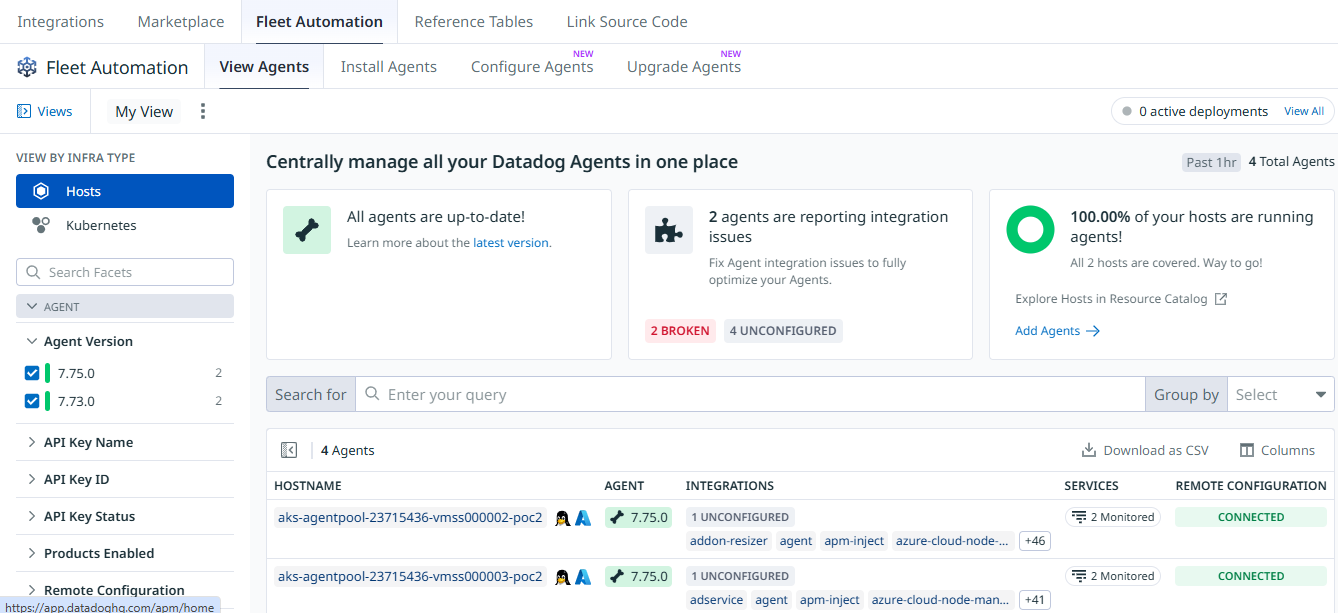
Step 3: Select the Affected Agent
- Identify the affected hostname
- Click the hostname to open agent details
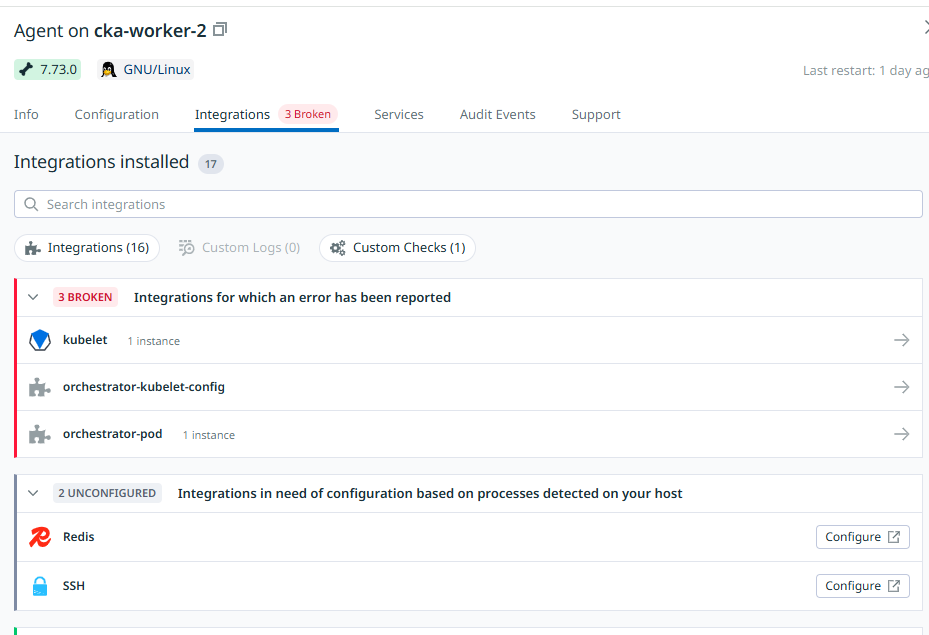
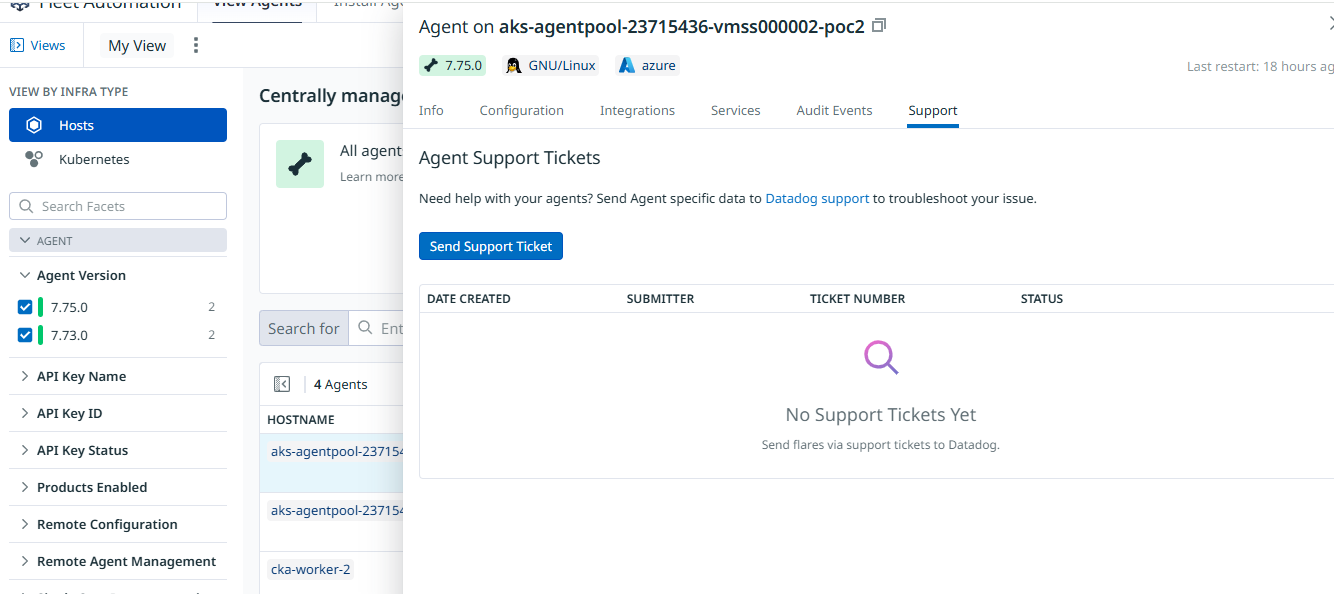
Step 4: Open the “Support” Tab
- Click the Support tab
- Click Send Support Ticket
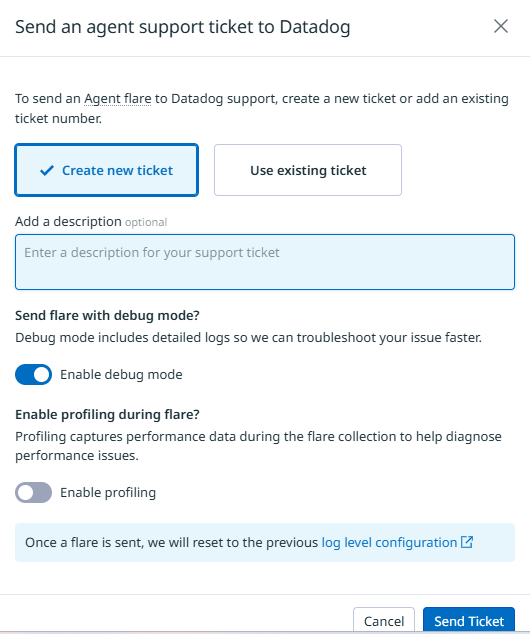
Step 5: Submit the Ticket
Provide:
- Clear subject line
- Detailed issue description
- Time of issue (with timezone)
- Environment (Production / Staging / Dev)
- Business impact
- Screenshots (if required)
Click Submit.
The system will automatically:
- Collect agent flare
- Attach diagnostic logs
- Send metadata to Datadog Support
METHOD 2: General Support Request
Use this method for non-agent-specific issues.
Step 1: Open Help Menu
- Click the ? icon (top-right corner)
- Select Live Chat With Support
Step 2: Explain the Issue
Provide:
- Clear problem statement
- Affected service/environment
- Time of occurrence
- Impact
Request:
"Please convert this conversation into a support ticket and share the ticket ID."
5. Required Information Checklist
Before submitting a ticket, ensure you include:
- Exact error message
- Timestamp (with timezone)
- Hostname or service name
- Agent version
- Cloud provider (AWS / Azure / GCP)
- Business impact description
- Steps to reproduce (if applicable)
Incomplete tickets may delay resolution.
6. Role and Access Requirements
If the Send Support Ticket button is disabled:
- Contact Organization Admin
- Request appropriate role access
Role verification path:
Organization Settings → Roles
Only users with proper permissions can raise agent-level support tickets.
7. Priority Guidelines
| Severity | Definition |
|---|---|
| Critical | Production outage or major monitoring failure |
| High | Significant degradation impacting services |
| Medium | Partial issue with workaround available |
| Low | General inquiry or non-urgent issue |
Follow internal escalation policy before marking tickets as Critical.
8. Post-Submission Actions
After raising a ticket:
- Save the Ticket ID
- Update internal incident tracking system (JIRA / ServiceNow)
- Inform DevOps Lead if production is impacted
- Respond promptly to Datadog support requests
9. Best Practices
- Be clear and specific
- Provide exact timestamps
- Avoid vague descriptions
- Attach screenshots when helpful
- Prefer Agent Support Ticket for agent-related issues (auto flare collection)
10. Final Outcome
Following this SOP ensures:
- Faster resolution times
- Structured escalation
- Minimal production impact
- Efficient communication with Datadog Support
Contact
Patrick Schmidt — patrick@airowire.com
Piyush Choudhary — piyush@airowire.com
Dr. Shivanand Poojara — shivanand@airowire.com